Free AI Resume Maker: Build a Job-Winning CV with AI in 2026
The best free AI resume makers in 2026, starting with Kindyra — the KCF community's own free AI resume builder. Plus Canva AI, Rezi and Kickresume.
By KindLearn Team · 2026-08-02 · 9 min read
A free AI resume maker can cut the time you spend on job applications from hours to minutes — and produce a polished, ATS-optimised CV that competes with resumes written by professional writers. This guide covers the best free AI resume builders in 2026, how to use them effectively, and the one addition that makes any resume significantly more competitive: a second language.
The job market in 2026 is ruthlessly efficient. Applicant Tracking Systems (ATS) filter most CVs before a human eye ever sees them. Recruiters spend an average of 6–7 seconds on initial resume review. And competition for good roles has never been more global. A free AI resume maker doesn't just save time — it gives every job applicant access to the same quality of formatting, keyword optimisation, and professional writing that used to require expensive career coaches.
Why AI resume makers are changing job applications in 2026
Until recently, producing a genuinely competitive resume required either natural writing talent, paid career coaching, or hours of iteration. AI resume tools change all three constraints simultaneously.
Modern free AI resume makers can:
- Generate professional bullet points from a brief description of your role and responsibilities
- Optimise language for ATS keyword matching based on the specific job description you're applying for
- Suggest quantification (turning "managed social media" into "grew social media following by 340% in 6 months")
- Format your CV to pass ATS scanning while remaining visually appealing to human reviewers
- Tailor your resume to specific industries or roles in seconds
The result is that job seekers who use AI resume tools are submitting better applications faster — and data from hiring platforms suggests they're seeing meaningfully higher callback rates as a result.
The best free AI resume makers in 2026
Here's a comprehensive comparison of the leading free AI resume makers, tested for genuine free access, feature quality, and output quality.
⭐ Community Pick — Built by KCF
Kindyra — the truly free AI resume maker for our community
Genuinely free? Yes — 100% free, no trial, no watermark, no paywall. Ever.
Kindyra is a free AI resume builder made by the Kindness Community Foundation — the same team behind KindLearn. It was built on a simple belief: job seekers should not have to pay to present themselves professionally. There are no credits to run out of, no forced upgrades, and no watermarks on your downloaded PDF.
For KindLearn users specifically, Kindyra is the natural first stop. It understands the value of language skills and gives them a prominent, well-formatted place in your CV — perfect if you've just completed a KindLearn 30-day challenge and want to showcase your new Spanish, French, or Japanese to employers.
What Kindyra gives you for free:
- AI-powered bullet point writer — describe your role, get professional output instantly
- ATS-optimised templates designed to pass automated screening
- Dedicated language skills section that highlights bilingual abilities
- Unlimited resume downloads, no watermarks
- Cover letter support
Our recommendation: Start with Kindyra at resume.kindyra.com before trying any other tool. It's the most aligned with what KindLearn learners need, and it's the only option on this list that is completely, permanently free with no catches.
1. Canva AI Resume Builder — best free from a third party
Genuinely free? Yes — core builder is free.
Canva's AI resume builder is the strongest genuinely free option in 2026. It combines professionally designed templates (hundreds of them, all free) with AI content suggestions powered by Magic Write. You describe your experience, Canva's AI generates professional bullet points, and you choose your preferred template from a library that covers everything from minimalist corporate to creative industry styles.
Canva's AI also helps with skills sections, summary statements, and objective lines. The output is visually polished and downloads as PDF for free. For most job seekers, particularly those applying to creative, marketing, or general business roles, Canva is the best place to start with a free AI resume maker.
Limitations: Less powerful for ATS keyword optimisation than dedicated resume AI tools. The AI writing is good but not deeply job-description aware.
2. Rezi — best free AI resume for ATS optimisation
Genuinely free? Partially — free plan with limited AI credits.
Rezi is one of the few AI resume builders specifically engineered around ATS compliance. Its free tier includes a core AI resume builder with a limited number of AI credits monthly for generating bullet points and content. The defining feature is Rezi's ATS score — a real-time score that tells you how likely your resume is to pass automated screening, with specific suggestions to improve it.
For applicants targeting corporate roles in finance, consulting, tech, or large enterprises (which almost universally use ATS), Rezi's ATS score feature is uniquely valuable. The free plan is enough to build and score one or two resumes per month.
Best for: Corporate job applications where ATS screening is likely; roles at large companies or tech firms.
3. Kickresume — free AI resume with cover letter
Genuinely free? Partially — one free resume download per month.
Kickresume's free plan lets you build a complete resume with AI assistance and download one PDF per month. Its AI features include a resume checker, automated bullet point suggestions, and a cover letter generator — all of which are at least partially available on the free tier. The template library is one of the strongest available, with over 90 professionally designed options including industry-specific layouts.
Kickresume also offers a LinkedIn import feature that dramatically speeds up the initial build — connect your LinkedIn, and Kickresume populates your experience, education, and skills automatically before the AI refines and formats it.
Best for: Job seekers who need a cover letter alongside their resume; those with a complete LinkedIn profile to import from.
4. Resume.io — polished templates, limited free tier
Genuinely free? Limited — free to build, paid to download in full quality.
Resume.io has some of the most professionally designed templates available. Its AI content suggestions are solid, and the builder interface is clean and intuitive. The limitation: the free plan lets you build and preview, but full PDF download requires a subscription ($2.95 for a 14-day trial, then $24.95/month).
This is worth knowing upfront. Resume.io is excellent if you use the 14-day trial for your job search push, but it's not a sustained free option in the way Canva or Kickresume are.
5. Enhancv — free tier with AI content blocks
Genuinely free? Partially — one free resume with watermark on free tier.
Enhancv takes a different approach to the resume — it allows non-traditional sections that show personality alongside credentials: a "Life philosophy" section, a "Most proud of" block, a "Day in my life" visual. The AI content suggestions for these sections are genuinely creative and produce resumes that stand out from standard CVs.
The free tier adds a watermark, which limits its practical use. But Enhancv is worth trying for creative industries or senior roles where differentiation matters more than rigid ATS formatting.
Best free AI resume maker by use case
- KindLearn community / truly free with no limits: Kindyra
- General use / best third-party free: Canva AI Resume Builder
- ATS-heavy corporate applications: Rezi
- Need a cover letter too: Kickresume
- Creative / non-traditional roles: Enhancv (with trial)
- Quick, LinkedIn-based build: Kickresume or LinkedIn's own AI resume tool
How to use a free AI resume maker effectively
A free AI resume maker is a starting point, not a finished product. Here's how to get the most out of one:
Step 1: Tailor to each job description
The single most impactful thing you can do is customise your resume for each application. Use the job description as a guide: identify the key skills and responsibilities it emphasises, then ask your AI resume tool to adjust your bullet points to reflect those keywords. ATS systems rank resumes partly on keyword match with the job posting — a tailored resume consistently outperforms a generic one.
Step 2: Quantify every claim the AI makes
AI-generated bullet points often read well but lack specifics. Review every line and add numbers wherever you have them: percentages, revenue figures, team sizes, timelines. "Led a team" becomes "Led a team of 8 engineers across 3 time zones." Quantified achievements are 40% more likely to get a recruiter's attention than generic descriptions, according to LinkedIn's hiring data.
Step 3: Run your ATS score before submitting
Use Rezi's free ATS checker, or paste your resume and the job description into a tool like Jobscan (limited free uses). An ATS score below 70% means significant keyword gaps. Address the gaps before applying — it takes 10 minutes and can be the difference between being screened out and getting an interview.
Step 4: Have a human read the final version
AI resume tools are excellent at formatting, keyword optimisation, and professional phrasing. They're less reliable at catching things that sound odd to human readers, or at expressing your personality authentically. Always have at least one trusted human read your final resume before submitting.
What AI resume makers can't do for you
It's worth being honest about the limits of even the best free AI resume maker.
They can't create experience you don't have. AI can phrase your experience compellingly, but it can't fabricate credentials. If a role requires 5 years of experience and you have 2, no AI tool changes that — and attempting to misrepresent it is a significant risk.
They can't replace strategy. A perfect resume for the wrong role is worthless. Knowing which roles to target, which companies to prioritise, and which relationships to build requires human judgement that AI tools don't provide.
They can't differentiate you on soft skills. Two equally formatted AI resumes are… equally formatted. The skills, experiences, and qualities that make you genuinely distinctive are things you bring, not things AI generates.
The skill that makes any resume stand out: a second language
Here's something that no free AI resume maker can generate for you, but that consistently differentiates candidates: a second language.
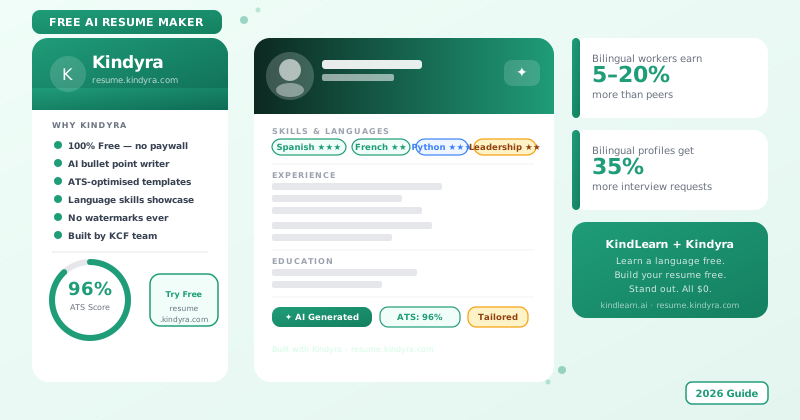
The data is unambiguous. A study by The Economist found that bilingual workers in the US earn an average of 2–5% more than comparable monolingual workers — but in international-facing roles, that premium rises to 10–20%. A 2024 LinkedIn analysis found that bilingual professionals receive 35% more interview requests than monolingual peers with otherwise equivalent profiles. And in fields like healthcare, education, law, customer service, and international business, language skills frequently appear in job descriptions as requirements, not preferences.
Adding a genuine language skill to your resume — marked as Conversational, Professional Working Proficiency, or Fluent depending on your level — is one of the highest-ROI things you can do for your employability. It's also one of the few resume additions that genuinely can't be faked.
This is where KindLearn's free 30-day language challenge becomes a career tool, not just a hobby. Commit 30 minutes a day for a month, use the AI conversation practice to build real speaking confidence, and by Day 30 you'll have a credential worth adding to your resume. Pick Spanish (the most in-demand second language for US employers), French (essential for Francophone markets), Mandarin (highest business value globally), or any of the 13 languages KindLearn teaches — all completely free.
Pairing an AI-optimised resume from Kindyra — or Canva or Rezi — with a genuine language skill from KindLearn is a combination that puts you ahead of the overwhelming majority of applicants. All of it is free. All of it is achievable in a single month.
How to add language skills to your resume correctly
When you add a language to your resume using a free AI resume maker, use the standard proficiency scale so recruiters know exactly what to expect:
- Elementary proficiency (A1–A2): Basic phrases and greetings. Don't list this unless the role specifically values any language exposure.
- Conversational / Limited Working Proficiency (B1): Can hold everyday conversations. Only list this if you genuinely can — recruiters in international roles test it in the interview. B1 is well beyond any 30-day course, KindLearn's included: ours is about five hours of study and the foundation of A1.
- Professional Working Proficiency (B2): Can conduct business conversations. List when accurate — most employers will test this.
- Full Professional Proficiency (C1): Near-native in professional contexts.
- Native / Bilingual Proficiency (C2): Native or equivalent.
Be honest about your level — recruiters in international roles will often test language proficiency in interviews. But "Conversational Spanish (B1)" earned through a genuine 30-day commitment to KindLearn is a legitimate, testable credential.
If you want more context on free AI learning tools beyond resume building — including language learning, coding, and professional skills — read our guide to the best free AI learning tools in 2026.
Frequently asked questions about free AI resume makers
What is the best free AI resume maker in 2026?
For KindLearn community members, Kindyra is our top pick — it's built by the same KCF team, it's 100% free with no limits or watermarks, and it specifically showcases language skills in a way no other tool matches. Among third-party options, Canva AI Resume Builder is the strongest genuinely free choice for most job seekers, with AI writing assistance, hundreds of professional templates, and unlimited free PDF downloads. For ATS-heavy corporate applications, combine either with Rezi's free ATS scoring tool.
Are AI-generated resumes detectable by recruiters?
AI resume formatting is widely used and broadly accepted — recruiters are not screening out AI-formatted resumes. The key is personalisation: a resume that clearly reflects your specific experience, quantified with your real numbers, and tailored to the specific role is indistinguishable from a human-written one. Generic AI outputs without personalisation are noticeable and unhelpful.
Do free AI resume makers pass ATS screening?
It depends on how you use them. Canva resumes (especially those using simple, clean templates) generally parse well in ATS. Rezi is specifically designed for ATS compliance. Avoid fancy multi-column layouts, text boxes, tables, or graphics — these break ATS parsing regardless of which tool generates them.
How long does it take to build a resume with a free AI resume maker?
With a LinkedIn profile to import from, Kickresume or LinkedIn's own tool can generate a complete first draft in under 10 minutes. Refining it with AI, tailoring to a specific job description, and running an ATS check typically takes 30–60 minutes total. Far faster than starting from a blank document.
Can adding a language skill really make my resume more competitive?
Yes — especially for roles with any international dimension, customer-facing functions, or in cities with large bilingual populations. Employers frequently list language skills as a plus, and being bilingual can help your resume stand out for roles with an international or customer-facing dimension. KindLearn's free 30-day challenge can get you to conversational level in your chosen language, giving you a genuine credential to add.